I tied up my current work on WebGL today with a presentation at the NCCA.
The presentation essentially outlined what WebGL is, what it has be used for and what I think it may be used for in the future. I highlighted the pipeline tool I made as a proof of concept for a cloud-based pipeline. The front end to this tool can still be found Here
Here is the presentation as a PDF.
For the moment I will be concentrating more on my OpenGL work as part of my course, but hope to one day return to WebGL for building more comprehensive, complete systems.
Here are some notes on good resources.
Giles Thomas. (2011). Learning WebGL. Available: http://learningwebgl.com/blog/. Last accessed 12th May 2011.
A great resource to start learning WebGL programming. This site begins with rendering flat white 2D shapes and over the course of 16 lessons, teaches advanced rendering techniques. This may even be considered an access point to learning more about OpenGL in general, as many of the processes are similar. Giles Thomas, the blogs founder, also regularly posts updates on where WebGL content can be found. A great place to find the latest cutting edge demos!
Chris Marrin. (2011). WebGL Specification. Available: http://www.khronos.org/registry/webgl/specs/ latest/ . Last accessed 12th May 2011.
The official specification of WebGL published by Khronos. If you are learning some WebGL, this is an essential reference that chronicles all the commands and variables available to you.
Google. (2011). WebGL Experiments. Available: http://www.chromeexperiments.com/webgl. Last accessed 12th May 2011.
A library of WebGL demos. This is the biggest resource of online experiments for WebGL. Organised much like a ‘youtube’ for WebGL demos.
Khronos Groups. (2011). Demo Repository - WebGL. Available: http://www.khronos.org/webgl/wiki/ Demo_Repository. Last accessed 12th May 2011.
A small list of WebGL technical demos. Often used to benchmark performance of different CG Techniques.
Wednesday, 18 May 2011

Wednesday, 6 April 2011
Obj Loader and WebGL Render - Demo 2
Here is an improved demo of WebGL rendering out the OBJs that I throw at it.
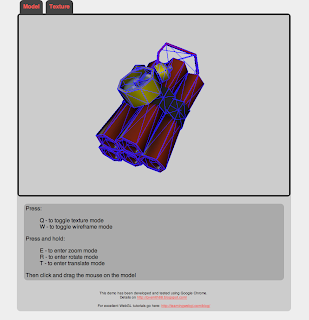
The updates include:

The updates include:
- Textures
- Wireframe
- Detailed Key and Mouse controls
- Page Layout improvements, including separate texture view
I have also developed a simple interface for user-uploading of an OBJ and Texture. Once uploaded you are redirected to the GLWindow to play with it... but more on this another time.
For now, if you want to check out the demo live, make sure you have a WebGL browser. (Chrome, Firefox Beta, Webkit Nightly etc)
If you're interested in this stuff please follow the blog and leave your thoughts and comments.
Questions and feedback are always welcome.
Technical Stuff:
I did a re-factor for this version in an attempt to separate the GL logic from the frontend canvas. Given the limited capabilities of Javascript to represent Objects, this was difficult. I am positive my JS could be more effective, but I am happy with the progress I made on this front.
As hinted at above, I also tweaked the OBJ loader. Significantly, I am now calculating Bounding Volume information, which gets included in the JSON format. This still needs a little testing, but my initial tests seem to be ok. My next step with the OBJ loader is to make it more generic and accept varying meshes. I also have a form and handler that automates the Obj Loading process.
In terms of rendering, I am setting flags in my key events that allow the user interactivity. These simply toggle the binding and drawing of certain buffers. For transformations, I am calculating values based on the difference in mouse position and setting up matrices accordingly.
The PHP ObjLoader can be found here
The WebGL can be read through "view source" on the demo.
As always, feedback is welcome
I did a re-factor for this version in an attempt to separate the GL logic from the frontend canvas. Given the limited capabilities of Javascript to represent Objects, this was difficult. I am positive my JS could be more effective, but I am happy with the progress I made on this front.
As hinted at above, I also tweaked the OBJ loader. Significantly, I am now calculating Bounding Volume information, which gets included in the JSON format. This still needs a little testing, but my initial tests seem to be ok. My next step with the OBJ loader is to make it more generic and accept varying meshes. I also have a form and handler that automates the Obj Loading process.
In terms of rendering, I am setting flags in my key events that allow the user interactivity. These simply toggle the binding and drawing of certain buffers. For transformations, I am calculating values based on the difference in mouse position and setting up matrices accordingly.
The PHP ObjLoader can be found here
The WebGL can be read through "view source" on the demo.
As always, feedback is welcome
Monday, 4 April 2011
PHP ObjLoader - Demo
I wrote yesterday about the PHP Obj Loader I had written, and today I prepared a simple demo!
The WebGL code has been adapted from http://learningwebgl.com/blog/
The model has been imported using the Obj Loader, converted to JSON and rendered in WebGL. To see a live demo of this in action go to my site to check it out. (You will need a WebGL enabled browser for this, I've been using Google Chrome but Webkit Nightly or Mozilla Beta should do)
Note: this link is now for demo 2
The demo is a proof of concept for the backend of a WebGL project I am working on at the NCCA. It shows the importing of complex, triangulated model, into Javascript for use with HTML5.
My plan is too extend the module to accomodate .obj files that contain exclusively Quads. These two functions will be sufficient for many of the tasks I want to complete. I will also incorporate FTP functions later on.
The code is open source and hosted on Google Code. That repository also contains examples on how to use the loader. (bear in mind, it will only work locally with full file paths for the moment)
On another topic: the video for Coin Sweeper, the game I made for my last assignment is now available for viewing, along with the report which can be found on my website.
If there are any questions or comments, please let me know :-)
 |
| Model by Elliot Spence for NCCA group project - Terminus |
The model has been imported using the Obj Loader, converted to JSON and rendered in WebGL. To see a live demo of this in action go to my site to check it out. (You will need a WebGL enabled browser for this, I've been using Google Chrome but Webkit Nightly or Mozilla Beta should do)
Note: this link is now for demo 2
The demo is a proof of concept for the backend of a WebGL project I am working on at the NCCA. It shows the importing of complex, triangulated model, into Javascript for use with HTML5.
My plan is too extend the module to accomodate .obj files that contain exclusively Quads. These two functions will be sufficient for many of the tasks I want to complete. I will also incorporate FTP functions later on.
The code is open source and hosted on Google Code. That repository also contains examples on how to use the loader. (bear in mind, it will only work locally with full file paths for the moment)
On another topic: the video for Coin Sweeper, the game I made for my last assignment is now available for viewing, along with the report which can be found on my website.
If there are any questions or comments, please let me know :-)
Sunday, 3 April 2011
PHP ObjLoader
Just finished writing a PHP Obj Loader for WebGL.
The basic requirement of the loader was to read in an .obj file, and turn it into something useful for use with WebGL. In order to do this, I wanted to write a PHP backend that could parse the information into JSON.
Also, I chose to format the dataset into Triangles, with no merged verts so I could tell GL to draw in GL_TRIANGLE mode with no worries.
The current version of the loader allows three lines to be called in order to output a .js version of the geometry:
These lines will output a file in the following format.
Now when setting up my buffers, I can simply include the script in the <head> tag and refer to these values to send on for shading.
I have begun to learn WebGL using the tutorials at http://learningwebgl.com/blog/?p=28
So to test this loader, I used the first tutorial (with some tweaks) and have rendered an obj successfully.
The basic requirement of the loader was to read in an .obj file, and turn it into something useful for use with WebGL. In order to do this, I wanted to write a PHP backend that could parse the information into JSON.
Also, I chose to format the dataset into Triangles, with no merged verts so I could tell GL to draw in GL_TRIANGLE mode with no worries.
The current version of the loader allows three lines to be called in order to output a .js version of the geometry:
$objLoader = new ObjLoader("geo/test.obj");
$objLoader->unpackForGl();
$objLoader->writeUnpackedToJson("geo/test.obj.js");
These lines will output a file in the following format.
var vertices = [
 -0.500000,-0.500000,0.500000,
 0.500000,-0.500000,0.500000,
 -0.500000,0.500000,0.500000
]

var texCoords = [
 -0.500000,-0.500000,0.500000,
 0.500000,-0.500000,0.500000,
 -0.500000,0.500000,0.500000
]

var normals = [
 -0.500000,-0.500000,0.500000,
 0.500000,-0.500000,0.500000,
 -0.500000,0.500000,0.500000
]
Now when setting up my buffers, I can simply include the script in the <head> tag and refer to these values to send on for shading.
I have begun to learn WebGL using the tutorials at http://learningwebgl.com/blog/?p=28
So to test this loader, I used the first tutorial (with some tweaks) and have rendered an obj successfully.
Coin Sweeper, first indie game
I recently completed a project for an NCCA module. The focus of the assignment was software design and I chose to make a simple, enjoyable game.
Coin Sweeper - NCCA first project from Peter Smith on Vimeo.
NB: for now, this video will remain private for assessment reasons
The focus of the game was too create something accessible and fun. As such, the focus was on gameplay more than graphical style or audio.
Details of the implementation can be found in my report at www.pj-smith.co.uk
Coin Sweeper - NCCA first project from Peter Smith on Vimeo.
NB: for now, this video will remain private for assessment reasons
The focus of the game was too create something accessible and fun. As such, the focus was on gameplay more than graphical style or audio.
Details of the implementation can be found in my report at www.pj-smith.co.uk
Saturday, 12 March 2011
Terminus - Group project
Below is a video of the group project we have just completed at the NCCA.
Thanks to my group members Andy Abgottspon, Simon Roth, Firuze Kiraz, Elliot Spence and Alex Poolton. Making this was a great learning experience and a lot of fun.
On this project I took care of Pipeline tools (exporting from Maya using Python). The navigation mesh for player movement, modelling and engine integration. Toward the end of the project I also scripted some animations in our Lua system (setup by Andy) and debugged some of the engine features.
Thanks to my group members Andy Abgottspon, Simon Roth, Firuze Kiraz, Elliot Spence and Alex Poolton. Making this was a great learning experience and a lot of fun.
On this project I took care of Pipeline tools (exporting from Maya using Python). The navigation mesh for player movement, modelling and engine integration. Toward the end of the project I also scripted some animations in our Lua system (setup by Andy) and debugged some of the engine features.
Thursday, 24 February 2011
Terminus - Triangle Class
Here is the Triangle class we are using for out navmesh. This is a mesh representing the walkable areas in the game. It is quick to implement and is working well.
#include <string.h>
#include "vec3.h"
#define SMALL_NUM 0.00000001 // anything that avoids division overflow
class Triangle {
vec3 m_v0,m_v1,m_v2; //verteces
vec3 m_edge1,m_edge2,m_normal;
public:
Triangle(const vec3 &_v0, const vec3 &_v1, const vec3 &_v2);
~Triangle();
bool intersectRay(const vec3 &_rayStart, vec3 *_intersectPoint);
void print() const;
};
//the intersect method
bool Triangle::intersectRay(const vec3 &_rayStart, vec3 *_intersectPoint)
{
//vec3 _intersectPoint;
vec3 dir, w0, w; // ray vectors
float r, a, b; // params to calc ray-plane intersect
dir = vec3(0.0,-100.0,0.0) - _rayStart; // ray direction vector
dir.Normalize();
w0 = _rayStart - m_v0;
a = -m_normal.Dot(w0);
b = m_normal.Dot(dir);
if (fabs(b) < SMALL_NUM)
{
// ray is parallel to triangle plane or ray disjoint from plane
return false;
}
// get intersect point of ray with triangle plane
r = a / b;
if (r < 0.0) // ray goes away from triangle
return false; // => no intersect
// for a segment, also test if (r > 1.0) => no intersect
*_intersectPoint = _rayStart + (r * dir); // intersect point of ray and plane
// is I inside T?
float uu, uv, vv, wu, wv, D;
uu = m_edge1.Dot(m_edge1);
uv = m_edge1.Dot(m_edge2);
vv = m_edge2.Dot(m_edge2);
w = *_intersectPoint - m_v0;
wu = w.Dot(m_edge1);
wv = w.Dot(m_edge2);
D = uv * uv - uu * vv;
// get and test parametric coords
float s, t;
s = (uv * wv - vv * wu) / D;
if (s < 0.0 || s > 1.0) // I is outside T
return false;
t = (uv * wu - uu * wv) / D;
if (t < 0.0 || (s + t) > 1.0) // I is outside T
return false;
return true; // I is in T
}
#include <string.h>
#include "vec3.h"
#define SMALL_NUM 0.00000001 // anything that avoids division overflow
class Triangle {
vec3 m_v0,m_v1,m_v2; //verteces
vec3 m_edge1,m_edge2,m_normal;
public:
Triangle(const vec3 &_v0, const vec3 &_v1, const vec3 &_v2);
~Triangle();
bool intersectRay(const vec3 &_rayStart, vec3 *_intersectPoint);
void print() const;
};
//the intersect method
bool Triangle::intersectRay(const vec3 &_rayStart, vec3 *_intersectPoint)
{
//vec3 _intersectPoint;
vec3 dir, w0, w; // ray vectors
float r, a, b; // params to calc ray-plane intersect
dir = vec3(0.0,-100.0,0.0) - _rayStart; // ray direction vector
dir.Normalize();
w0 = _rayStart - m_v0;
a = -m_normal.Dot(w0);
b = m_normal.Dot(dir);
if (fabs(b) < SMALL_NUM)
{
// ray is parallel to triangle plane or ray disjoint from plane
return false;
}
// get intersect point of ray with triangle plane
r = a / b;
if (r < 0.0) // ray goes away from triangle
return false; // => no intersect
// for a segment, also test if (r > 1.0) => no intersect
*_intersectPoint = _rayStart + (r * dir); // intersect point of ray and plane
// is I inside T?
float uu, uv, vv, wu, wv, D;
uu = m_edge1.Dot(m_edge1);
uv = m_edge1.Dot(m_edge2);
vv = m_edge2.Dot(m_edge2);
w = *_intersectPoint - m_v0;
wu = w.Dot(m_edge1);
wv = w.Dot(m_edge2);
D = uv * uv - uu * vv;
// get and test parametric coords
float s, t;
s = (uv * wv - vv * wu) / D;
if (s < 0.0 || s > 1.0) // I is outside T
return false;
t = (uv * wu - uu * wv) / D;
if (t < 0.0 || (s + t) > 1.0) // I is outside T
return false;
return true; // I is in T
}
Terminus - group project game.
Here are some images of the game we are currently making as part of a group project at the NCCA. We have built a mini-engine from scratch and built all assets ourselves.


Sunday, 12 December 2010
L-System - Render Method
Render Method
One of the critical algorithms to consider is the rendering function of the RuleManager class. Below is a proposed solution and justification for the method. The method will be recursive. Although this can often be more intensive on the CPU, it is important that every time we process a rule, we want to perform the same steps. We need to delve into the rules definition and perform the same process for every character. Given that the complexity of the solution depends on the users ruleset and the levels of branching they require, recursion is, I think, the most elegant and flexible solution.
Here is the function signature:
void render( const string & stringToProcess );
psuedoCode:
foreach char in stringToProcess
if char is in CoreRules
tell engine to draw / roll etc.
elseif char is in UserRules AND currentRecursionLevel < branches
++recursionLevel
render( UserRules[char] ) // recursive call
--recursionLevel
else
cout << "Cannot find rule: " + char
L-System Plan
Below is an initial plan for a command-line L-Sytem modelling tool for my 2010-2011 Animation Software Development project. This is simply the thoughts I have had so far on the system, not a complete and perfect plan for the best plant modelling tool ever seen!
Here's the brief
Requirements
The first iteration of the system will be a command line program but will be designed with the flexibility and scope for future developments as a GUI app.
The user should be able to run the program in the command line, passing in arguments, including a file path referencing the location of a text file which will define their custom L-System grammar. This text format will be called a L-System Rule Base file, or .lrb
Here is a rough idea of the file format that the system should be able to interpret

The top 4 variables will be used to set up the state of the drawing engine. The fourth value 'cylinderwidth' will only be expected when the option -c is passed into the program. If -c is passed and this field is missing, it will default to 1. Each value will have static default values. This will ensure the program will run regardless. I will however, issue some fairly strong warnings to the console if the variables aren't present.
Branches is the levels of recursion we want to be limited to (we don't want infinite madness)
Stepsize is the unit size of each branch.
Angle is the size, in degrees, of the angle upon each turn.
The only other necessary field is the 'axiom' field. This will specify the starting point of the rendering.
With branches set to 2, the above LRB file would be re-written to:
AB
FF[+FA]F//FF
FF[+FFF[+FA]]F//FF
In summary, the requirements of the system are that the user should be able to define simple rules in a .lrb file that will be passed to the program. These rules should set up the system variables as the user desires as well as outline the conventional grammar of their L-System.
Implementation
Although initially the app will not be a GUI app, it will be built in the Model-View-Controller design pattern. A DrawEngine will be the Model, handling all of the OpenGL heavy lifting. A RuleManager will handle the string passing and user rules. In this instance the view will simply be an OpenGL context held in a QT Main Window.
The user will communicate (through their .lrb) to the RuleManager, which will pass their rules into internal dynamic data structures for rendering. The RuleManager will then communicate with the DrawEngine telling it what to draw.
The DrawEngine
The focus of this class is to setup the shaders and vertex-buffer objects ready to be drawn. In addition to this it will hold the TransformationStack and the core functions of the L-System.
Firstly, as my task is only to allow modelling of plant-like structures. I require only basic shaders, the most important feature of which is moving vertex position. Secondly, the drawing engine will create and draw lines by default, as the user is able to choose cylinder drawing mode, it will also create a ngl::VBOPrimitive Cylinder.
In rendering, the engine will keep track of the current transformation matrix on a stack. (starting at identity) The other methods in the class are the core L-System utility functions.
How is it actually drawn?!
Here is the key to how the DrawEngine will work to give the user the results they want.
If a user uses an "F" in their ruleset, it will draw a line/cylinder from the current position along the current heading (held in the transform stack). The current position in the matrix will then be changed to reflect this 'forward' move.
If a user uses a ' / ' character in their ruleset the system will alter the current matrix to rotate around the positive Z axis, by the amount of the angle variable (defined in .lrb). Here is a simple example of this in action:

This is obviously extremely simple, but is a good example of the kind of operations the engine will handle. The user can only manipulate the engines core functionality.
The RuleManager
One of the key decisions with this class is how we store the string data needed for the system. My first decision in this respect was how the core engine rules (F f / \ + etc.) should be stored. I opted for a std::map. The rationale for this is so that I can store a character (rule) and bind it to a corresponding function pointer of the DrawEngine. For example, F will be bound to the function forwardDraw() and the ' / ' character to the roll() function.
For the user defined rules I will have a std::map of type <string, string>. The rule name will be the key and the rule definition will be the value.
The two main purposes of this class are to read the users .lrb into internal data structures and system variables and also to tell the DrawEngine to execute the commands held in the users L-System grammar.
The first task will involve using regular expressions and matching strings. This suggests that using a flexible library like boost for working with strings would be a good idea.
The second task will be handled by a method called render(). This method will be the focus of the next section on algorithmic considerations as it arguably the most critical and potentially intensive parts of the system. It is responsible for reading the axiom and from that, instructing the DrawEngine what to draw.
Algorithms and Class Diagrams to follow
Here's the brief
Develop an interface that allows L-systems based modelling or plant like structures using OpenGL. The L-system grammar should be specified from a text file.
Requirements
The first iteration of the system will be a command line program but will be designed with the flexibility and scope for future developments as a GUI app.
The user should be able to run the program in the command line, passing in arguments, including a file path referencing the location of a text file which will define their custom L-System grammar. This text format will be called a L-System Rule Base file, or .lrb
Here is a rough idea of the file format that the system should be able to interpret

The top 4 variables will be used to set up the state of the drawing engine. The fourth value 'cylinderwidth' will only be expected when the option -c is passed into the program. If -c is passed and this field is missing, it will default to 1. Each value will have static default values. This will ensure the program will run regardless. I will however, issue some fairly strong warnings to the console if the variables aren't present.
Branches is the levels of recursion we want to be limited to (we don't want infinite madness)
Stepsize is the unit size of each branch.
Angle is the size, in degrees, of the angle upon each turn.
The only other necessary field is the 'axiom' field. This will specify the starting point of the rendering.
With branches set to 2, the above LRB file would be re-written to:
AB
FF[+FA]F//FF
FF[+FFF[+FA]]F//FF
In summary, the requirements of the system are that the user should be able to define simple rules in a .lrb file that will be passed to the program. These rules should set up the system variables as the user desires as well as outline the conventional grammar of their L-System.
Implementation
Although initially the app will not be a GUI app, it will be built in the Model-View-Controller design pattern. A DrawEngine will be the Model, handling all of the OpenGL heavy lifting. A RuleManager will handle the string passing and user rules. In this instance the view will simply be an OpenGL context held in a QT Main Window.
The user will communicate (through their .lrb) to the RuleManager, which will pass their rules into internal dynamic data structures for rendering. The RuleManager will then communicate with the DrawEngine telling it what to draw.
The DrawEngine
The focus of this class is to setup the shaders and vertex-buffer objects ready to be drawn. In addition to this it will hold the TransformationStack and the core functions of the L-System.
Firstly, as my task is only to allow modelling of plant-like structures. I require only basic shaders, the most important feature of which is moving vertex position. Secondly, the drawing engine will create and draw lines by default, as the user is able to choose cylinder drawing mode, it will also create a ngl::VBOPrimitive Cylinder.
In rendering, the engine will keep track of the current transformation matrix on a stack. (starting at identity) The other methods in the class are the core L-System utility functions.
How is it actually drawn?!
Here is the key to how the DrawEngine will work to give the user the results they want.
If a user uses an "F" in their ruleset, it will draw a line/cylinder from the current position along the current heading (held in the transform stack). The current position in the matrix will then be changed to reflect this 'forward' move.
If a user uses a ' / ' character in their ruleset the system will alter the current matrix to rotate around the positive Z axis, by the amount of the angle variable (defined in .lrb). Here is a simple example of this in action:

This is obviously extremely simple, but is a good example of the kind of operations the engine will handle. The user can only manipulate the engines core functionality.
The RuleManager
One of the key decisions with this class is how we store the string data needed for the system. My first decision in this respect was how the core engine rules (F f / \ + etc.) should be stored. I opted for a std::map. The rationale for this is so that I can store a character (rule) and bind it to a corresponding function pointer of the DrawEngine. For example, F will be bound to the function forwardDraw() and the ' / ' character to the roll() function.
For the user defined rules I will have a std::map of type <string, string>. The rule name will be the key and the rule definition will be the value.
The two main purposes of this class are to read the users .lrb into internal data structures and system variables and also to tell the DrawEngine to execute the commands held in the users L-System grammar.
The first task will involve using regular expressions and matching strings. This suggests that using a flexible library like boost for working with strings would be a good idea.
The second task will be handled by a method called render(). This method will be the focus of the next section on algorithmic considerations as it arguably the most critical and potentially intensive parts of the system. It is responsible for reading the axiom and from that, instructing the DrawEngine what to draw.
Algorithms and Class Diagrams to follow
Subscribe to:
Posts (Atom)